




Tab Deck Logo

Your AI-Powered
Vertical Tabs Manager

Take control of your web browsing with our Vertical Tabs Manager browser extension. Effortlessly manage multiple tabs at once from the side panel for a seamless browsing experience.

No credit card required
App screenshot
Vertical Tabs Manager

Vertical tabs manager lives in your browser

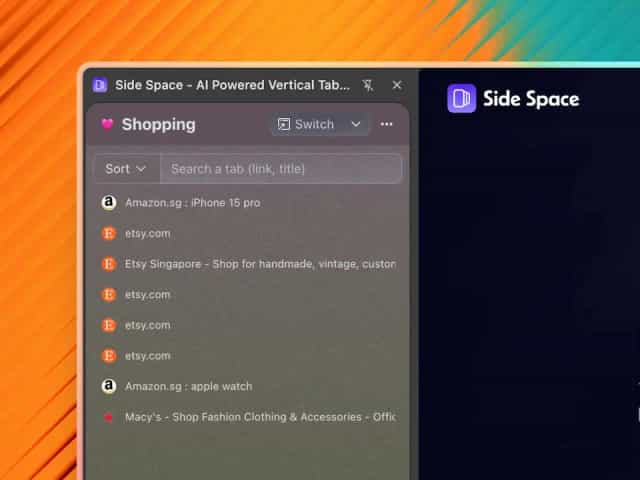
With Side Space, you can manage your browser tabs in a vertical panel on the side of your screen, making it easier to scan, identify, and switch between them.

Side Panel in your browser
Overview

Tired of messy, disorganized browser tabs?
we have a solution for you.

With Side Space, all your tabs are neatly organized into vertical spaces in a side panel making tabs easy to find, manage and focus on. Say goodbye to tab chaos!

Spaces for your work、life and hobbies

Your browser tabs are neatly organized into separate categories for work, life, shopping, school, and hobbies. To make your thoughts clearer, focus on the present space.

Group tabs easily using AI
Organize tabs between spaces in one windows
Switch space quickly
Focus on one space at a time
Autosave every spaces
Easily restore tabs
Operating expenses
Sync across devices
Never worry about losing tabs

Every tabs in spaces is autosaved, you can access them on any chrome browsers by simply logging into your account. Restore your tabs anytime.

AI-powered Tab Grouping

Tired of endless tabs? Let AI group and organize them for you! Stay focused on browsing with ease.

Features

Dive into powerful features
Supercharge your tab management

Take your tab management to the next level with these powerful features

Auto Sync
Tabs automatically sync across devices so your spaces are always up to date.
Theme
Support for customizing the Space color palette, making your Space better suited to your preferences.
Multi Language
Support for 5 languages: English, Chinese, French, Spanish, and Japanese.
Dark mode
Seamlessly switch to dark mode for comfortable night browsing.
Pin Tabs
Pin key tabs for quick access in each spaces, similar to speed dial.
Search Tabs
Instantly find any tab or space with fuzzy search.
Suspend Tabs
Temporarily suspend tabs to free up system memory.
De-duplicate Tabs
Automatically remove duplicate tabs from spaces for clean organization.
Space Switcher
Seamlessly switch between your saved spaces, allowing you to maintain a focused workspace.
Save/Restore Tab Groups
Easily save and restore groups of tabs within a space. No more losing your tab workflow.
Space Management
Manage your spaces with ease, including renaming, theming, ordering, deleting, and more.
Copy all URLs
Copy all URLs of tabs in a space to your clipboard with markdown/text/json format.
Move to New Windows
Move the selected tab groups or ungrouped tabs to new windows.
Group Guard
Group Guard is a feature that can auto-detect and group tabs by custom categories.
Group Tabs by domain
Quickly group all tabs from the same domain with one click.
Group Tabs by AI
Group your open tabs with one click using AI, based on your custom categories.
Testimonial

Trusted by users

Don't just take our word for it. Read what others say about Side Space.

Pricing

Simple, transparent pricing
for everyone

Pay once, use forever access unlimited spaces. Free updates for life.

Free

You can create up to 5 free spaces to manage your tabs, AI Chat with your current focus open tab.

$0
  • Up to 5 spaces with cloud sync
  • Up to 1000 URLs with AI Grouping
  • Customized Shortcuts Templates
  • AI Chat History with Cloud Sync
  • BYOK (Bring Your Own Key) to access AI Models
  • AI Chat Mode for current page
  • Tab Group Guarding
  • Space Management
  • Basic support
  • Free updates for life!

Lifetime

For hoarders of tabs, access to unlimited spaces and unlimited AI Grouping URLs.

$39 Until November 28, 2025
  • Unlimited spaces with cloud sync
  • Unlimited URLs with AI Grouping
  • Customized Shortcuts Templates
  • AI Chat History with Cloud Sync
  • BYOK (Bring Your Own Key) to access AI Models
  • Side Copilot(BETA) Agent for browser automation
  • Tab Group Guarding
  • Space Management
  • Lifetime Premium support
  • Free updates for life!

Each new purchase is granted 100% money back within 7 days from purchase date. After you have purchased a license, sign in and register the license to unlock all features.

FAQ

Frequently Asked Questions

Need help with something? Here are our most frequently asked questions.

How does the product work?

Good question, why we need a tab manager that live in your side panel. But when you have used the Vertical tabs in Microsoft Edge browser or the Window Panel in Vivaldi browser, you will understand, because using a side panel to manage tabs is really convenient.

Side Space is a Chrome browser extension created to fill the empty side panel area. It provides tab management capabilities in this previously unused space.

Why do I need to sign in?

Side Space currently offer two optional third-party login options, Google and GitHub. Logging in with these accounts allows you to sync your data to the cloud.

This means that when you log in to another browser or device with your account, your saved spaces will be synchronized.

What does "lifetime" mean?
Is it a one-time payment?
Is there a free version available?
What is your refund policy?

If there are any serious issues with the license, reach out and let us know via support@sidespace.app within 7-days and we'll issue a full refund.

You'll no longer be able to saving or access more than 5 spaces if we issue a refund. But we can help you saving the tabs in the cloud for 30-days in case you want to recover your spaces again. We think that's pretty fair! You can read the full refund policy in the License Agreement.